What Happens When You Open a Website? A Complete Journey From URL to Web Page
What actually happens after you type a website address into your browser and press Enter? Follow the complete journey from DNS lookup and secure connections to servers, databases, APIs, HTML, CSS, JavaScript, browser rendering, caching, and the final web page.
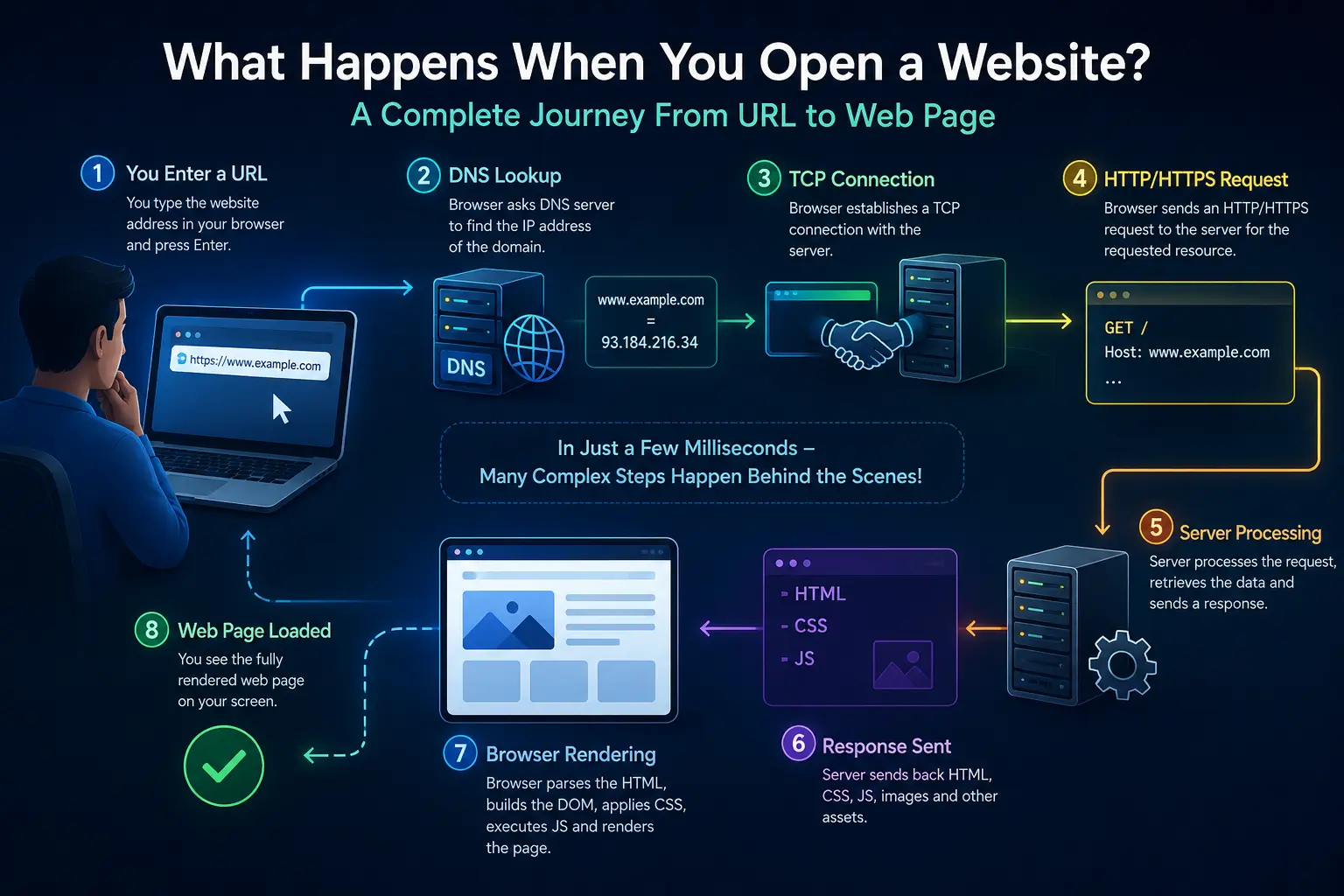
“Every time you type a website address into a browser and press Enter, a complex sequence of operations takes place within a few seconds or even milliseconds. The browser needs to identify the server associated with the domain, establish a network connection, securely communicate with that server, send an HTTP request, receive the required resources, and transform those resources into the web page you see on your screen. Behind a modern website there may be domain name systems, DNS resolvers, CDNs, load balancers, web servers, application servers, databases, APIs, caching systems, authentication services, and frontend applications. Understanding this journey provides a practical foundation for learning web development because it connects concepts such as domains, hosting, HTTP, HTTPS, backend development, databases, APIs, HTML, CSS, JavaScript, and browser rendering into one complete process. This guide follows a typical website request from the moment a user enters a URL until the browser displays an interactive web page, while also explaining how modern architectures such as server-side rendering, static generation, APIs, CDNs, and client-side applications fit into the process.”
The Journey From URL to Web Page
When a user enters a URL such as https://example.com into a browser, the browser does not immediately receive a finished web page. Instead, several systems work together to locate the correct server, establish communication, request resources, process the request, and render the returned content.
A simplified journey looks like this: the browser interprets the URL, resolves the domain through DNS, establishes a network connection, negotiates secure communication when HTTPS is used, sends an HTTP request, receives a response, downloads additional resources, processes HTML, CSS, and JavaScript, and finally constructs the visual and interactive page.
Modern websites can introduce additional components such as CDNs, reverse proxies, load balancers, authentication services, backend APIs, databases, caching layers, and third-party services. The exact sequence varies according to the architecture, but the fundamental concepts remain similar.
Technical Takeaways
Step 1: What Is a URL?
A URL, or Uniform Resource Locator, identifies a resource and provides information about how a client can access it. A typical HTTPS URL may contain a scheme, domain name, port, path, query parameters, and fragment.
For example, in https://example.com/products?id=25, https is the scheme, example.com is the hostname, /products is the path, and id=25 is a query parameter. The browser uses these components to determine how the request should be constructed.
The fragment portion of a URL, such as #reviews, is generally handled by the browser after the resource is retrieved and is commonly used to identify a particular location within a document or application state.
Technical Takeaways
Step 2: The Browser Interprets the URL
When a URL is entered, the browser first parses it to determine the destination and communication protocol. If the URL uses HTTPS, the browser knows that secure HTTP communication is expected. The browser also determines the hostname and the resource path that should be requested.
Before contacting a remote server, the browser and operating system may be able to reuse information from caches or existing connections. If the required information is not already available, the browser begins the network process needed to reach the destination.
This initial stage may appear invisible to the user, but it establishes the instructions for everything that follows.
Technical Takeaways
Step 3: DNS Turns the Domain Into an IP Address
Computers communicate across IP networks using IP addresses, while humans generally prefer memorable domain names. DNS, or the Domain Name System, connects these two worlds by helping translate a hostname such as example.com into an IP address associated with the destination service.
A browser may first check its own DNS information, followed by operating-system or network-level caches. If the required information is not available locally, a DNS resolver can perform the necessary lookup through the DNS hierarchy.
DNS can involve multiple levels of servers and records. The resolver may ultimately obtain an address from an authoritative DNS server responsible for the domain. The resulting information can then be cached for a period of time according to DNS configuration.
DNS is therefore not simply a permanent database containing every domain-to-IP mapping in one place. It is a distributed naming system designed to make domain resolution scalable and manageable.
Technical Takeaways
Why DNS Caching Matters
DNS resolution does not necessarily happen from the beginning every time a user opens a website. DNS information can be cached by browsers, operating systems, local networks, and resolvers. This reduces repeated lookup work and can improve connection speed.
DNS records have a time-to-live value that helps determine how long a resolver may cache a response. Website infrastructure teams need to consider DNS caching when changing hosting providers, servers, IP addresses, or other DNS configurations.
DNS caching is one of several caching mechanisms involved in modern web performance. Browser caching, CDN caching, server-side caching, and application-level caching can all reduce the amount of work required for subsequent requests.
Technical Takeaways
Step 4: Establishing a Network Connection
After the browser has an IP address for the destination, it needs a network connection through which data can be exchanged. Traditionally, HTTP communication over TCP involves establishing a TCP connection before application data is exchanged.
TCP provides reliable, ordered delivery of data between endpoints. The connection establishment process allows the two endpoints to begin communicating and provides mechanisms for handling transmission-related issues.
Modern web traffic can also use newer transport technologies such as HTTP/3 over QUIC. These technologies are designed to improve connection establishment and performance under certain network conditions. The exact transport depends on the browser, server, and network configuration.
Technical Takeaways
Step 5: HTTPS and the TLS Handshake
Most modern websites use HTTPS rather than unencrypted HTTP. HTTPS protects HTTP communication by using TLS, or Transport Layer Security. TLS helps provide encryption, server authentication, and protection against certain forms of communication tampering.
During a TLS connection, the client and server negotiate security parameters and establish cryptographic keys for the session. The server presents a certificate that allows the browser to verify that the connection is associated with the requested domain according to the certificate and trust model.
Once the secure connection is established, HTTP messages can be transmitted through the encrypted channel. This is especially important when websites handle passwords, payment information, personal data, authentication tokens, or other sensitive information.
Technical Takeaways
Step 6: The Browser Sends an HTTP Request
After the connection is ready, the browser can send an HTTP request to the server. An HTTP request contains information describing what resource the client wants and may include headers containing additional information about the request.
A simple page navigation commonly uses the GET method. Other HTTP methods such as POST, PUT, PATCH, and DELETE are commonly used by web applications when creating, updating, or deleting resources.
The request may contain headers describing the browser, accepted content types, cookies, caching information, authentication information, or other request metadata. The server uses this information to determine how to process the request.
Technical Takeaways
Understanding HTTP Methods
HTTP methods communicate the intended operation of a request. GET is commonly used to retrieve resources. POST is frequently used to submit data or create a new resource. PUT and PATCH can be used to update resources, while DELETE can be used to remove resources.
The method does not by itself determine the complete behavior of an application. The server-side application defines how each endpoint handles the request, validates incoming information, interacts with other systems, and produces a response.
Understanding HTTP methods is important when working with APIs because modern web applications frequently communicate through HTTP endpoints rather than requesting only complete HTML documents.
Technical Takeaways
Step 7: The Web Server Receives the Request
The request eventually reaches infrastructure responsible for accepting and processing web traffic. This may be a web server, reverse proxy, CDN edge server, load balancer, application server, or a combination of these components.
Common web server software can serve static files, terminate TLS connections, route requests, apply security policies, proxy traffic to backend applications, and manage connections. In larger architectures, a reverse proxy may receive the request first and decide where it should go next.
The infrastructure layer may also check whether the requested resource is already available in a cache. If a valid cached response exists, the request may be fulfilled without executing the complete backend application workflow.
Technical Takeaways
CDNs: Bringing Content Closer to Users
A Content Delivery Network, or CDN, consists of distributed infrastructure designed to deliver content efficiently from locations closer to users. Static resources such as images, stylesheets, JavaScript files, videos, and other cacheable content can often be served from CDN edge locations.
When a user requests a cached resource, the CDN may be able to return it directly instead of sending the request all the way to the origin server. This can reduce latency, decrease origin-server load, and improve performance for users in geographically distributed locations.
CDNs can also provide additional capabilities such as TLS termination, traffic management, caching rules, compression, and certain security protections depending on the provider and configuration.
Technical Takeaways
Step 8: Load Balancers and Traffic Distribution
High-traffic applications often run multiple server instances instead of relying on a single machine. A load balancer can distribute incoming requests across available application or web servers.
Traffic distribution improves scalability and can help maintain availability when individual instances become unavailable. Depending on the architecture, load balancers can consider factors such as server health, connection counts, routing rules, geographic location, or other criteria.
A user may therefore believe they are communicating with one website, while the request is actually being handled by one of many servers operating behind shared infrastructure.
Technical Takeaways
Step 9: Static Content vs Dynamic Content
Not every website request requires backend code or a database query. Static resources are files or generated outputs that can be served without calculating a personalized response for every request. HTML files, CSS files, JavaScript bundles, images, fonts, and documents can often be delivered this way.
Dynamic requests require processing based on information such as user identity, request parameters, application state, or database records. For example, a personalized dashboard may require the server to authenticate the user, retrieve account information, and generate or return the appropriate data.
Modern websites frequently combine static and dynamic approaches. A page can be statically generated while still making dynamic API requests from the browser after loading.
Technical Takeaways
Step 10: The Backend Application Processes the Request
For a dynamic request, a backend application may receive the HTTP request and execute application logic. Backend technologies include Node.js, PHP, Python, Java, .NET, Go, Ruby, and many others.
The backend may validate request parameters, authenticate users, apply business rules, communicate with databases, call external APIs, perform calculations, process uploaded files, or construct a response.
For example, when a user opens an e-commerce product page, the backend may determine which product was requested, retrieve its information, check availability, apply business rules, and return the data required by the frontend.
Technical Takeaways
Step 11: How Databases Become Part of the Request
Many web applications need persistent data such as user accounts, products, orders, articles, messages, settings, or transactions. Databases provide systems for storing and retrieving this information.
When the backend needs information, it can execute an appropriate database operation. Relational databases such as MySQL and PostgreSQL organize information using tables and relationships, while NoSQL databases use other data models suited to particular workloads.
The backend should generally act as the controlled intermediary between the browser and sensitive database operations. Exposing a database directly to an untrusted client would create serious security and data-integrity risks in many application architectures.
Technical Takeaways
Step 12: APIs Connect Different Parts of an Application
An API, or Application Programming Interface, provides a defined way for software components to communicate. Modern websites frequently use APIs to connect frontend applications with backend services, databases, payment providers, authentication systems, analytics platforms, and other services.
For example, a React or Next.js frontend might request product information from a backend API. The API processes the request and returns structured data, often using JSON. The frontend then uses that data to update the user interface.
APIs make it possible to separate responsibilities between systems. A mobile application and a web application can sometimes use the same backend services while providing different user interfaces.
Technical Takeaways
Step 13: The Server Sends an HTTP Response
After processing the request, the server sends an HTTP response back to the client. The response contains a status code, response headers, and usually a response body.
Status codes communicate the general result of the request. A 200 response indicates successful processing, 301 and 302 are commonly associated with redirects, 404 indicates that a requested resource was not found, and 500-series responses indicate server-side errors.
Response headers provide additional information such as content type, caching instructions, cookies, compression, security policies, and other metadata. The response body contains the actual resource or data requested by the client.
Technical Takeaways
Step 14: The Browser Receives the HTML
For a traditional document navigation, the initial response often contains HTML. HTML describes the structure and semantic content of the page. The browser parses the returned HTML and constructs an internal representation called the DOM, or Document Object Model.
As the browser parses the HTML, it can discover additional resources such as stylesheets, scripts, images, fonts, and other assets. The browser may then issue additional HTTP requests to retrieve those resources.
This means opening one webpage does not necessarily involve only one HTTP request. A single HTML document can lead to dozens or even hundreds of additional resource requests depending on the complexity of the application.
Technical Takeaways
Step 15: CSS Determines How the Page Looks
CSS, or Cascading Style Sheets, controls the presentation of HTML elements. It can define layout, spacing, typography, colors, responsive behavior, animations, and many other visual properties.
The browser parses CSS and creates information about which styles apply to which elements. It then combines the document structure with style information to determine how elements should be displayed.
Modern websites often use CSS frameworks, utility systems, component libraries, or generated styles, but the browser ultimately needs CSS rules or equivalent styling information to determine the visual presentation.
Technical Takeaways
Step 16: JavaScript Makes the Website Interactive
HTML provides structure and CSS provides presentation, while JavaScript can add behavior and application logic in the browser. JavaScript can respond to user interactions, modify the DOM, communicate with APIs, validate forms, manage application state, and dynamically update content.
A modern web application may download JavaScript bundles that contain a significant portion of its application logic. Frameworks such as React provide abstractions for building interactive interfaces, while frameworks such as Next.js can combine server-side and client-side techniques.
JavaScript execution is one reason modern websites can behave more like applications than traditional documents. Clicking a button may trigger an API request and update only part of the interface without requiring the entire page to reload.
Technical Takeaways
Step 17: How the Browser Builds the Page
The browser must transform downloaded resources into pixels that can be displayed on the screen. It parses HTML into the DOM and processes CSS to determine styling information. The browser then calculates layout, determines which elements need to be painted, and composites the resulting layers for display.
The rendering pipeline can involve stages commonly described using concepts such as style calculation, layout, paint, and compositing. JavaScript can trigger changes that require some of these stages to run again, which is why inefficient scripts or excessive layout changes can affect performance.
The browser also has to manage fonts, images, animations, scrolling, user input, accessibility information, and many other concerns while maintaining a responsive experience.
Technical Takeaways
The Critical Rendering Path
The critical rendering path describes the sequence of operations required for the browser to turn HTML, CSS, and other essential resources into visible content. Resources that block or delay these stages can influence how quickly users see meaningful content.
Developers therefore pay attention to the size and delivery of HTML, CSS, JavaScript, fonts, and images. Techniques such as minimizing unnecessary resources, optimizing images, caching assets, prioritizing important content, and reducing render-blocking work can improve perceived and actual performance.
Website performance is not simply about making a server respond quickly. The complete journey from network request through browser processing and rendering determines what users experience.
Technical Takeaways
Step 18: Browser Caching Makes Repeat Visits Faster
When a browser downloads resources, those resources may be stored according to HTTP caching policies. If the user requests the same resource again, the browser may be able to reuse the locally stored version rather than downloading it again.
Caching can significantly reduce network traffic and improve loading performance. Websites can define cache-related response headers that tell browsers and intermediate systems how resources should be stored and validated.
Caching must be designed carefully. Long-lived caching is useful for versioned static assets because their URLs can change when their contents change. Dynamic or frequently changing information may require shorter caching periods or validation mechanisms.
Technical Takeaways
Step 19: Cookies, Sessions, and User Identity
Many websites need to remember information about a user's interaction with the application. Cookies provide one mechanism for storing small pieces of information associated with a domain and sending appropriate cookie data with subsequent requests.
Authentication systems can use cookies or other mechanisms to associate requests with a logged-in session. The backend can then identify the user and provide personalized responses.
Secure applications must configure authentication-related cookies and sessions carefully. Attributes such as Secure, HttpOnly, and appropriate SameSite settings can contribute to safer cookie handling, depending on the application's architecture.
Technical Takeaways
Step 20: What Happens When You Click a Button?
Once the initial page is loaded, many interactions do not require the browser to request a completely new HTML document. JavaScript can capture a click event, validate information, send an API request, receive a response, and update a portion of the interface.
For example, clicking Add to Cart might trigger a JavaScript event. The frontend can send product and quantity information to a backend API. The backend can validate the request, update the user's cart in the database, and return the updated cart state. The frontend can then update the cart icon or summary without reloading the entire page.
This interaction demonstrates how frontend, backend, API, database, authentication, and browser rendering technologies work together within a modern web application.
Technical Takeaways
Where Next.js Fits Into the Process
Modern frameworks such as Next.js provide tools for building React-based web applications using different rendering and delivery strategies. Depending on the application, pages or components can be rendered on the server, generated ahead of time, or rendered and updated in the browser.
When a request reaches a Next.js application, the framework can determine how the requested route should be handled. A server-rendered page may involve server-side processing before HTML is returned. A statically generated page may already have an HTML representation available for efficient delivery. Client-side JavaScript can then provide interactive behavior after the page reaches the browser.
This means a Next.js application can combine server-side rendering, static generation, API interactions, caching, and client-side React behavior rather than relying on a single rendering model for every page.
Technical Takeaways
Traditional Websites vs Modern Web Applications
A traditional website may work primarily by requesting HTML documents from a server. Each navigation can result in a new document being downloaded and rendered. This architecture remains useful for many content-oriented websites.
A modern web application may instead use a combination of server-rendered HTML, client-side JavaScript, APIs, dynamic data, and application state. Examples include dashboards, online stores, collaboration tools, banking interfaces, and complex SaaS platforms.
Neither architecture is universally better. The appropriate approach depends on content requirements, user experience, SEO needs, performance goals, application complexity, team expertise, and infrastructure constraints.
Technical Takeaways
What Happens When Something Goes Wrong?
The journey from URL to page contains many possible failure points. DNS may fail to resolve a domain, a network connection may be unavailable, a TLS certificate may be invalid, a server may be overloaded, a backend application may return an error, a database may be unavailable, or a required frontend resource may fail to load.
Browsers expose different types of errors depending on where the failure occurs. HTTP errors such as 404 or 500 are responses from a server, while DNS, TLS, or network failures may prevent a normal HTTP response from being received at all.
Modern development teams use logs, monitoring, browser developer tools, network inspection, application performance monitoring, and infrastructure metrics to diagnose these failures.
Technical Takeaways
How Developers Debug a Website Request
Browser developer tools provide a practical window into the process described in this article. The Network panel can show individual HTTP requests, response status codes, transferred resources, timing information, headers, and caching behavior.
The Console can reveal JavaScript errors and warnings. Other tools can help inspect the DOM, CSS, storage, performance metrics, and application state. Developers can combine this browser-level information with backend logs and server monitoring to trace a request through the complete system.
Understanding the request lifecycle makes debugging significantly easier because developers can ask a structured question: did the failure occur during DNS resolution, connection establishment, server processing, resource delivery, JavaScript execution, or rendering?
Technical Takeaways
Why Website Performance Depends on the Entire Journey
A website's performance is influenced by every stage between the user's device and the final rendered page. Slow DNS resolution, network latency, large server responses, inefficient database queries, excessive JavaScript, unoptimized images, render-blocking resources, and expensive browser operations can all contribute to a slower experience.
Improving performance therefore requires looking at the entire system rather than focusing on one metric. Backend optimization, database indexing, caching, CDN configuration, image optimization, code splitting, efficient rendering, and frontend optimization can all play a role.
The best performance improvements are usually based on measurement rather than assumptions. Developers can use real-world and laboratory performance data to identify bottlenecks and prioritize improvements.
Technical Takeaways
Security Throughout the Website Request Lifecycle
Security is not a single feature added at the end of development. It needs to be considered across the complete request lifecycle. HTTPS protects communication in transit, while authentication and authorization control access to application resources.
Servers and APIs must validate incoming data rather than trusting information supplied by clients. Database access should be controlled, sensitive information should be protected, dependencies should be maintained, and security headers and application policies should be configured appropriately.
The browser itself also provides security mechanisms such as the same-origin policy and other platform controls that help isolate websites and restrict certain types of unauthorized interaction.
Technical Takeaways
The Complete Journey in One Example
Imagine a user enters https://shop.example.com/products/42 into a browser. The browser parses the URL and determines that HTTPS should be used. It needs to resolve shop.example.com through DNS and obtain an appropriate IP address.
The browser then establishes the required network connection and negotiates TLS security. It sends an HTTP request for /products/42. The request may first reach a CDN, reverse proxy, or load balancer before being forwarded to the appropriate application server.
The application determines that product 42 is being requested. It may retrieve product information from a database and construct the response. If the application uses server-side rendering, the server may produce HTML containing the product information. If the page uses an API-driven architecture, the browser may receive application resources and subsequently request product data through an API.
The browser receives the necessary HTML and discovers CSS, JavaScript, image, and font resources. It requests those resources, builds the DOM and style information, calculates layout, paints the page, executes necessary JavaScript, and displays the final interface.
If the user then clicks Add to Cart, JavaScript may send another API request. The backend validates the request, updates the user's cart, and returns a response. The frontend processes the response and updates the interface. All of this may happen without loading an entirely new page.
Technical Takeaways
Why Understanding This Process Matters for Web Developers
Web development involves much more than writing HTML, CSS, and JavaScript. Developers who understand how browsers, networks, servers, APIs, databases, and rendering systems interact can diagnose problems more effectively and make better architectural decisions.
A frontend developer benefits from understanding HTTP and browser rendering. A backend developer benefits from understanding how clients send requests and consume responses. A full-stack developer needs to understand the complete journey because performance and reliability often depend on interactions between multiple layers.
This knowledge also makes frameworks easier to understand. Instead of treating React, Next.js, Node.js, PHP, databases, CDNs, or hosting platforms as isolated technologies, developers can see how each component fits into the broader web architecture.
Technical Takeaways
Key Takeaways
Opening a website is a coordinated process involving many layers of technology. The browser interprets a URL, resolves the domain, establishes communication, securely sends an HTTP request, and receives a response from infrastructure that may include CDNs, proxies, servers, and backend applications.
The backend may interact with databases and APIs before returning data or HTML. The browser then downloads required resources, constructs the DOM, processes CSS, executes JavaScript, performs layout and rendering, and presents the final interface to the user.
Once this process is understood, many web development concepts become easier to connect. Domains, DNS, hosting, HTTPS, servers, APIs, databases, frontend frameworks, caching, CDNs, and browser rendering are not isolated concepts. They are interconnected parts of the journey that turns a URL into an interactive web experience.
Technical Takeaways
How Rubrich Technologies Approaches Modern Web Development
Rubrich Technologies develops modern web solutions by considering the complete application architecture rather than treating the frontend as an isolated layer. Depending on project requirements, a solution may include responsive interfaces, frontend frameworks, backend services, REST APIs, database integration, authentication, deployment infrastructure, performance optimization, and search-engine-friendly rendering strategies.
The appropriate architecture depends on the project. A content-focused website may benefit from static generation and CDN delivery, while a complex business application may require dynamic APIs, authentication, databases, and server-side processing. Frameworks such as Next.js can support hybrid approaches where different parts of an application use different rendering strategies.
Understanding what happens between entering a URL and seeing a webpage is one of the foundations of professional web development. It allows businesses, developers, and technology teams to make more informed decisions about architecture, performance, security, scalability, and user experience.